The Apple Lisa was a personal computer designed at Apple Computer, Inc. during the early 1980s. Officially, “Lisa” stood for “Local Integrated Software Architecture”, but it was also the name of Apple co-founder Steve Jobs’ daughter.
The Lisa project was started at Apple in 1978 and evolved into a project to design a powerful personal computer with a graphical user interface (GUI) that would be targeted toward business customers.
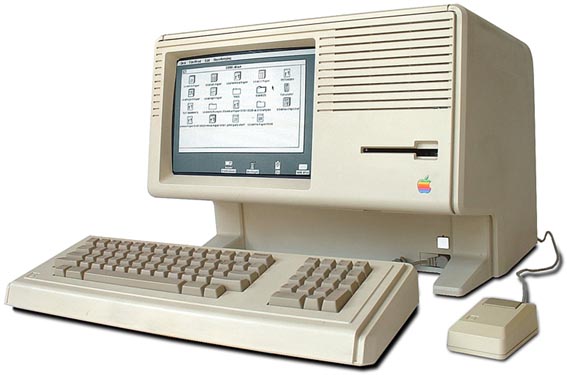
In September 1980, Steve Jobs was forced out of the Lisa project, so he joined the Macintosh project instead. Contrary to popular belief, the Macintosh is not a direct descendant of Lisa, although there are obvious similarities between the systems and the final revision, the Lisa 2/10, was modified and sold as the Macintosh XL.

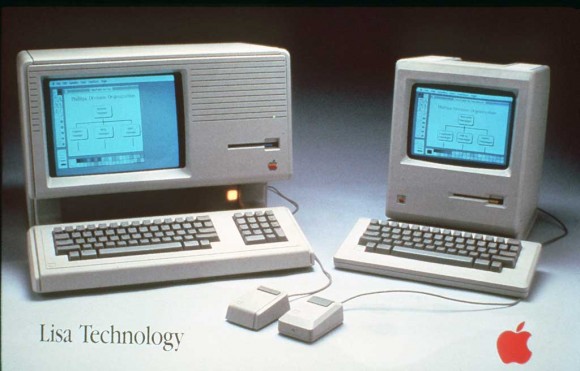
The Lisa was a more advanced (and far more expensive) system than the Macintosh of that time in many respects, such as its inclusion of protected memory, cooperative multitasking, a generally more sophisticated hard disk based operating system, a built-in screensaver, an advanced calculator with a paper tape and RPN, support for up to 2 megabytes of RAM, expansion slots, and a larger higher resolution display. It would be many years before many of those features were implemented on the Macintosh platform. Protected memory, for instance, did not arrive until the Mac OS X operating system was released in 2001. The Macintosh, however, featured a faster 68000 processor (7.89 MHz) and sound. The complexity of the Lisa operating system and its programs taxed the 5 MHz Motorola 68000 microprocessor so that the system felt sluggish, particularly when scrolling in documents.
Etymology
While the documentation shipped with the original Lisa only ever referred to it as The Lisa, officially, Apple stated that the name was an acronym for Local Integrated Software Architecture or “LISA”. Since Steve Jobs’ first daughter (born in 1978) was named Lisa Jobs, it is normally inferred that the name also had a personal association, and perhaps that the acronym was invented later to fit the name. Hertzfeld states that the acronym was reverse engineered from the name “Lisa” in autumn 1982 by the Apple marketing team, after they had hired a marketing consultancy firm to come up with names to replace “Lisa” and “Macintosh” (at the time considered by Rod Holt to be merely internal project codenames) and then rejected all of the suggestions. Privately, Hertzfeld and the other software developers used “Lisa: Invented Stupid Acronym”, a recursive backronym. It is also important to note that Lisa team member Larry Tesler’s daughter is named Lisa.
Hardware
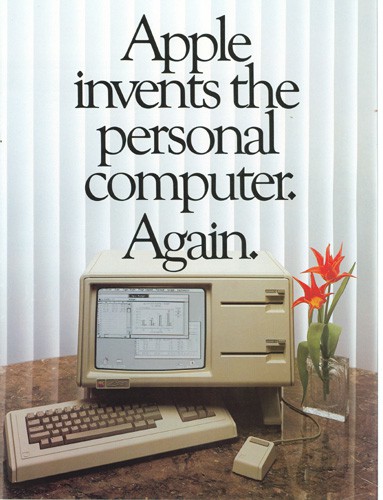
The Lisa was first introduced in January 19, 1983 at a cost of $9,995 US ($21,482.26 in 2008 dollars). It is one of the first commercial personal computers to have a GUI and a mouse. It used a Motorola 68000 CPU at a 5 MHz clock rate and had 1 MB RAM.
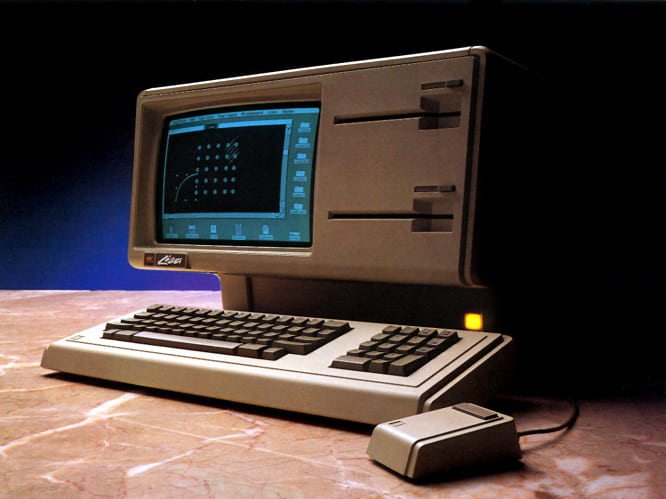
The original Lisa has two Apple FileWare 5¼ inch double-sided floppy disk drives, more commonly known by Apple’s internal code name for the drive, “Twiggy”. They have a capacity of approximately 871 kilobytes each, but required special diskettes. The drives have the reputation of not being reliable, so the Macintosh, which was originally designed to have a single Twiggy, was revised to use a Sony 400k microfloppy drive in January 1984. An optional external 5 MB or, later, a 10 MB Apple ProFile hard drive (originally designed for the Apple III) was also offered.

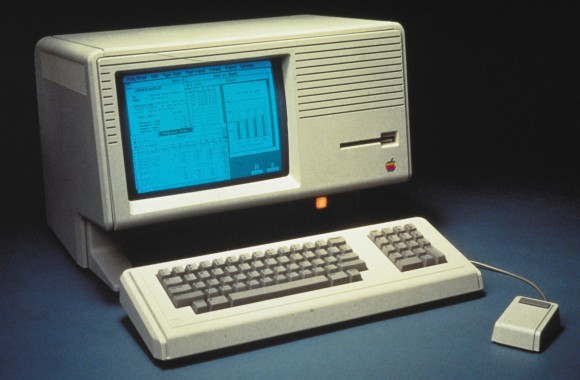
The first hardware revision, the Lisa 2, released in January 1984 priced between $3,495 and $5,495 US, was much less expensive than the original model and dropped the Twiggy floppy drives in favor of a single 400k Sony microfloppy. It was possible to purchase the Lisa 2 with a ProFile and with as little as 512k RAM. The final version of the Lisa available includes an optional 10 MB internal proprietary hard disk manufactured by Apple, known as the “Widget”. In 1984, at the same time the Macintosh was officially announced, Apple announced that it was providing free upgrades to the Lisa 2 to all Lisa 1 owners, by swapping the pair of Twiggy drives for a single 3½ inch drive, and updating the boot ROM and I/O ROM. In addition, a new front faceplate was included to accommodate the reconfigured floppy disk drive. With this change, the Lisa 2 had the notable distinction of introducing the new Apple inlaid logo, as well as the first Snow White design language features.
There were relatively few third-party hardware offerings for the Lisa, as compared to the earlier Apple II. AST offered a 1.5 MB memory board, which when combined with the standard Apple 512 KB memory board, expanded the Lisa to a total of 2 MB of memory, the maximum the MMU could address.
Late in the product life of the Lisa, there were third-party hard disk drives, SCSI controllers, and double-sided 3½ inch floppy-disk upgrades. Unlike the Macintosh, the Lisa features expansion slots. It is an “open system” like the Apple II.
The Lisa 2 motherboard is a very basic backplane with virtually no electronic components, but plenty of edge connector sockets/slots. There are 2 RAM slots, 1 CPU slot & 1 I/O slot all in parallel placement to each other. At the other end, there are 3 ‘Lisa’ slots, parallel to each other. This flexibility provides the potential for a developer to create a replacement for the CPU ‘card’ to upgrade the Lisa to run a newer CPU, albeit with potential limitations from other parts of the system.
Software
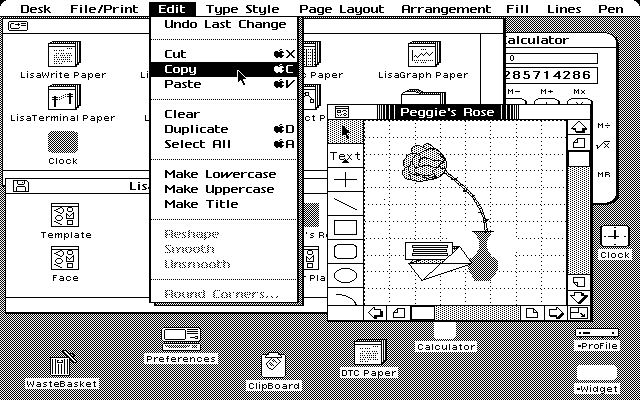
The Lisa operating system features cooperative (non-preemptive) multitasking and virtual memory, then extremely advanced features for a personal computer. The use of virtual memory coupled with a fairly slow disk system makes the system performance seem sluggish at times.

Based in part on advanced elements from the failed Apple III SOS operating system released 3 years earlier, the Lisa also organized its files in hierarchal directories, making the use of large hard drives practical. The Macintosh would eventually adopt this disk organizational design as well for its HFS filing system. Conceptually, the Lisa resembles the Xerox Star in the sense that it was envisioned as an office computing system; consequently, Lisa has two main user modes: the Lisa Office System and the Workshop. The Lisa Office System is the GUI environment for end users. The Workshop is a program development environment, and is almost entirely text-based, though it uses a GUI text editor. The Lisa Office System was eventually renamed “7/7”, in reference to the seven supplied application programs: LisaWrite, LisaCalc, LisaDraw, LisaGraph, LisaProject, LisaList, and LisaTerminal.
Third-party software
A significant impediment to third-party software on the Lisa was the fact that, when first launched, the Lisa Office System could not be used to write programs for itself: a separate development OS was required called Lisa Workshop. An engineer runs the two OSes in a dual-boot config, writing and compiling code on one machine and testing it on the other. Later, the same Lisa Workshop was used to develop software for the Macintosh. After a few years, Macintosh-native development system was developed. For most of its lifetime, the Lisa never went beyond the original seven applications that Apple had deemed enough to do “everything.”
MacWorks
In April 1984, following the success of the Macintosh, Apple introduced MacWorks, a software emulation environment which allowed the Lisa to run Macintosh System software and applications. MacWorks helped make the Lisa more attractive to potential customers, but did not enable the Macintosh emulation to access the hard disk until September. In January 1985, re-branded MacWorks XL, it became the primary system application designed to turn the Lisa into the Macintosh XL.
Business blunder
The Apple Lisa turned out to be a commercial failure for Apple, the largest since the Apple III disaster of 1980. The intended business computing customers balked at Lisa’s high price and largely opted to run less expensive IBM PCs, which were already beginning to dominate business desktop computing. The largest Lisa customer was NASA, which used LisaProject for project management and which was faced with significant problems when the Lisa was discontinued.
The Lisa is also seen as being a bit slow in spite of its innovative interface. The release of the Apple Macintosh in 1984, which received far better marketing, was the most significant factor in the Lisa’s demise. The Macintosh appeared, on the surface due to its GUI and mouse, to be a wholesale improvement and was far less expensive. Two later Lisa models were released (the Lisa 2 and its Mac ROM-enabled sibling Macintosh XL) before the Lisa line was discontinued in April 1985. In 1986, Apple offered all Lisa/XL owners the opportunity to turn in their computer and along with US$1,498.00, would receive a Macintosh Plus and Hard Disk 20 (a US$4,098.00 value at the time).

See also:
Demo Apple Lisa (1983) | Mac History
Source:
Apple Lisa. (2008, September 29). In Wikipedia, The Free Encyclopedia. Retrieved 16:08, October 12, 2008, from http://en.wikipedia.org/w/index.php?title=Apple_Lisa&oldid=241738203
Walter Isaacson: Steve Jobs, Simon & Schuster, New York, 2011, Page 110.
This article is published under the GNU General Public License

Pingback: On death « Work in Progress
Pingback: Χρόνια Πολλά Apple Lisa και Apple IIe | Greek iPhone
Pingback: 12 Days of Apple Christmas, Part 1 « My Favorite Apple
Pingback: The Great History of Personal Computer from Memex to iPhone
Pingback: Prima di “1984” | MelaBit
Pingback: Not Every Product Becomes an iPhone: 3 Big Apple Inc. Flops | Stocks Online, Investing in Bonds and Mutual Fund Investing
Pingback: A Graphical Revolution: Making sense of zeros and ones | Aiden Lesanto: Reflective Journals
Guten Tag,
Very good Lisa article with many wonderful facts. Thank you for providing this information.
One area of the Lisa program development which you may want to add is the LISA TOOLKIT. This was a collection of object-based libraries and a modified Lisa Pascal compiler which the Lisa developer used within the Lisa Workshop. The Tool Kit provided a Lisa developer with what was called an “application framework” which contained the key programming structures for a Lisa program. The Tool Kit allowed the Lisa developer to focus on the content of their program and let the Tool Kit handle the program framework such as windows, scrolling, mice, dialogs, printing, copying/pasting.
The Tool Kit used a special version of the Apple Lisa Pascal compiler which was used by Apple’s internal and third party developers. This compiler implemented object-based programming and was called the Clascal compiler (Clascal = Classes with Pascal). Clascal was developed by a small team of Lisa developers headed by Larry Tesler who was the original manager of the Lisa applications group (e.g. they developed programs such as LisaWrite).
For more details about the Tool Kit and Clascal see the wonderful collection of Apple materials at BitSavers.org:
The Lisa Tool Kit was later modified to run on the Apple Macintosh within its MPW development environment where it was called MacApp. Larry Tesler et al were also responsible for MacApp.
http://www.mirrorservice.org/sites/www.bitsavers.org/pdf/apple/lisa/toolkit_university/Clascal_Reference_Manual_Mar83.pdf
Tschuess
– David Craig July 8, 2016
PS: The figure labeled “Screenshot Apple Lisa” originated on my Lisa. Note the “DTC Paper” icon which is a LisaWrite stationery document, the “DTC” are my name initials “David T Craig”.
Pingback: 07/30 - Apple 沒有 Lisa 電腦的失敗,或許就沒有麥金塔的成功 | 3PM.hk |esport|電競|打機|遊戲|Online Game|Mobile Game
Pingback: Machine Learning, Data Science, and Unicorns – Cloud Data Architect
Pingback: Machine Learning, Data Science, and Unicorns – Browse your web
Pingback: Feeding the Elephant: Building for Enterprise Customers – By Jason Cole | Jobber TechTalk
Pingback: Eine kleine Geschichte der Projektmanagement-Tools auf dem Mac – Zauberwerk
Pingback: 淺談 Mac 硬體史(上):從 Apple Lisa、Power Macintosh 到今日的 Mac – 蘋果仁 – 你的科技媒體
Pingback: A zongoragyakorlás ellenségei - Különleges zongoraoktatás
Pingback: El software del Lisa, el legendario (y fracasado) ordenador de Apple, volverá en 2018 gratis y en código abierto - Soynadie Press Agency
Pingback: El software del Lisa, el legendario (y fracasado) ordenador de Apple, volverá en 2018 gratis y en código abierto | JanyoBytes
Pingback: El software del Lisa, el legendario (y fracasado) ordenador de Apple, volverá en 2018
Pingback: El software del Lisa, el legendario (y fracasado) ordenador de Apple, volverá en 2018 gratis y en código abierto
Pingback: El software del Lisa, el legendario (y fracasado) ordenador de Apple, volverá en 2018 gratis y en código abierto – ATB Argentina
Pingback: El software del Lisa, el legendario (y fracasado) ordenador de Apple, volverá en 2018 gratis y en código abierto – Radio News Balcarce
Pingback: El software del Lisa, el legendario (y fracasado) ordenador de Apple, volverá en 2018 | Caribbean Digital
Pingback: El software del Lisa, el legendario (y fracasado) ordenador de Apple, volverá en 2018 gratis y en código abierto – movilísimos
Pingback: Source code for Apple's historic Lisa OS to be made available in 2018 – News2K
Pingback: Source code for Apple’s historic Lisa OS to be made available in 2018 – Ars Technica | | All Breaking News
Pingback: Source code for Apple’s ancient Lisa OS to be made on hand in 2018 - CNN Daily News
Pingback: Appleの伝説のコンピューター「Lisa」OSソースコードが無料公開へ … – ギズモード・ジャパン – ITC
Pingback: Appleの伝説のコンピューター「Lisa」OSソースコードが無料公開へ … – ギズモード・ジャパン | ittips.work
Pingback: Appleの伝説のコンピューター「Lisa」OSソースコードが無料公開へ – ギズモード・ジャパン – デジタル
Pingback: Appleの伝説のコンピューター「Lisa」OSソースコードが無料公開へ – ギズモード・ジャパン | omotyaya.click
Pingback: Appleの伝説のコンピューター「Lisa」OSソースコードが無料公開へ – ギズモード・ジャパン – kadenno.click
Pingback: Appleの伝説のコンピューター「Lisa」OSソースコードが無料公開へ – ギズモード・ジャパン – monono.click
Pingback: Appleの伝説のコンピューター「Lisa」OSソースコードが無料公開へ – ギズモード・ジャパン – mono.コム
Pingback: 7 Of The Most Expensive Computer Systems Produced Throughout History !! - iamhindustan.com
Pingback: 10 Personality Traits of Legendary Entrepreneurs - Synergy Capital
Pingback: 10 Personality Traits of Legendary Entrepreneurs | News World
Pingback: Como criar listas de funcionalidades para conquistar clientes - Kaksi Media
Pingback: Top 10 Apple Failures – List Website
Pingback: The Incredible Value of Business Mentors | LoTops
Pingback: Eric Schmidt — Lessons from a Trillion-Dollar Coach (#367) – readly.info
Pingback: Eric Schmidt — Lessons from a Trillion-Dollar Coach (#367) - Self Development Portal
Pingback: I Tried to Limit My Screen Time – IE Media News
Pingback: How to Find Your Purpose in Life - Your Perfect Day - Vincent Wei @MakerTheory
Pingback: Eric Schmidt — Lessons from a Trillion-Dollar Coach (#367) - The Staging Site of Author Tim Ferriss
Pingback: Weird Science (1985) – Hindsight is Horrifying
Pingback: স্টিভ জবস এর DIFFERENT স্টোরি টেলিং | ME01 – Brandpractitioners.com
Pingback: 21 éves a legjobb Apple-film - IThon.hu | Techben otthon vagyunk!
Pingback: Egér - A kezdetektől napjainking - IThon.hu | Techben otthon vagyunk!
Pingback: Human Centered Design: David Kelley and the IDEO Way – Strong Files
Pingback: Lab 2 – Basic Computer Hardware – Site Title
Pingback: jonandnic dot com - Maintainers of Lightning - Part 1
Pingback: Steve Jobs: An Extraordinary Career - Biz Times Today
Pingback: UX 設計歷史 | 永恆茉莉美學殿堂 Eternal Jasmine AESTHETICS PALACE
Pingback: Traits of Great Entrepreneurs - The Scope News
Pingback: What does inflation mean? In 2021 its higher fuel, food and car costs – BMG
Pingback: Why Is Everything So Expensive? A Quick Look At What 1982-level Inflation Means In 2021 - USA TODAY
Pingback: Why is everything so expensive? A quick look at what 1982-level Inflation means in 2021 - USA TODAY - Vogue Wellness
Pingback: 19 มกราคม 2526 บริษัทแอ็ปเปิ้ล เปิดตัว แอ็ปเปิ้ล ลิซ่า (Apple Lisa) คอมพิวเตอร์ ส่วนบุคคล รุ่นแรกที่มีร
Pingback: 10 Examples of Vintage Computing Still in Wide Use Today - Listverse
Pingback: 10 Examples of Vintage Computing Still in Wide Use Today – Profound News
Pingback: Human-Computer Interaction | OneZeroEight
Pingback: Impact of culture on illustration | OneZeroEight
Pingback: 10 Examples of Vintage Computing Still in Wide Use Today - Dial a Nerd
Pingback: Apple Inc. Dominates The Tech World: 46 Years of Success - TeckYou
Pingback: La razón por la que falló la computadora Apple Lisa
Pingback: What is the Difference Between GUI Interface and Textual Interface?
Pingback: Apple’s Lisa, a Marketing Failure – Parvej's Blog
Pingback: Apple Lisa – Full Tech Specs, Release Date, and Original Price
Pingback: Tech Time Warp: Apple introduces the Lisa, its first personal computer – Sabtrax
Pingback: The Real Significance Of Apple's Macintosh - Celestial Chronicle
Pingback: एप्पल के मैकिंटोश का वास्तविक महत्व - Hindi Celestial Chronicle
Pingback: The actual significance of Apple’s Macintosh • The Register – Handcuffeherald
Pingback: The real significance of Apple's Macintosh - DUK News
Pingback: The real significance of Apple's Macintosh • The Register - News Digest Blog
Pingback: How rich is Forrest Gump? – How rich is Gump