Author Archives:

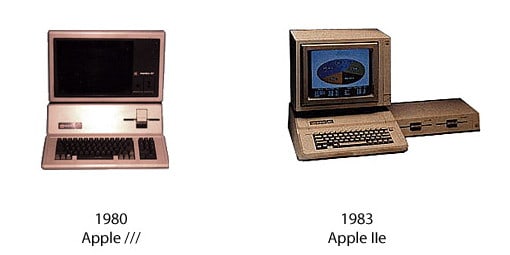
Apple III and Apple IIe

Apple III

Apple III

Apple III

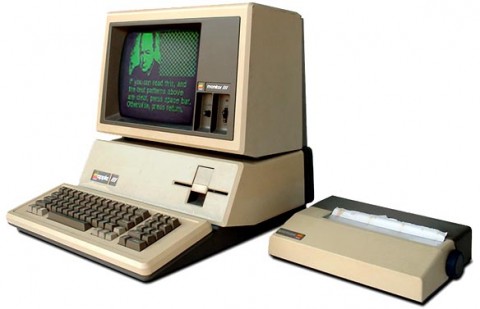
The Apple III (often rendered as Apple ///) is a personal computer that was manufactured and sold by Apple from May, 1980 until its discontinuation on April 24, 1984. Its predecessor, the better-known Apple II, was designed by Apple co-founder Steve Wozniak. Intended as a computer for the business user market, design work on the Apple III started in late 1978 under the guidance of Dr. Wendell Sander. It had the internal code name of “Sara”, named after Sander’s daughter.

History and design

The Apple III was designed to be a business computer and a successor for the Apple II . It featured an advanced operating system called Apple SOS, or “Sophisticated Operating System”, pronounced “Apple Sauce” and a new BASIC interpreter, “Apple /// Business BASIC” (an implementation of UCSD Pascal was also offered for more structured programming). Other features included an 80-column display with upper and lowercase characters, a numeric keypad, support for a real-time clock, 6-bit (DAC) audio, 16-color graphics, and a hierarchical file system. It included a built-in 140 KB 5.25″ floppy disk drive, with up to three additional external “Disk ///” floppy disk drives, which were only compatible with the Apple ///. In addition they required an adapter for use on the /// Plus. Originally intended as a direct replacement to the Apple II series, it was designed for backwards-compatibility of Apple II software in order to migrate users over. However, since Apple did not want to encourage continued development of the II platform, they limited its capabilities to emulate a basic 48 KB Apple II+ configuration, with no access to the III’s advanced features, a restriction which actually required custom chips to enforce.

The Apple III was powered by a 2 MHz SynerTek 6502A 8-bit CPU and, like some of the more advanced machines in the Apple II family, used bank switching techniques to address up to 256 KB of memory (512 KB with a third-party upgrade).

The Apple III was the first Apple product that allowed the user to choose both a screen font and a keyboard layout:either QWERTY or Dvorak. These choices could not be changed while programs were running, unlike the Apple IIc, which had a keyboard switch directly above the keyboard, allowing switching on the fly.
The Apple III with an Apple Monitor //.

The Apple III had a System Utilities program, which allowed system reconfiguration and file manipulation. Another program, Selector III, was designed to integrate with the System Utilities program and launch various applications. However, Apple decided not to finish this project, and the engineers and writers working on the project bought the right to market Selector III to Apple III owners for a nominal fee. However, another company, Quark Software, developed a competing product, Catalyst, the cruder interface of which was offset by program-switching capabilities and support for copy-protection, which enabled companies to license users to run programs from a hard disk without worrying that their software might be backed up or copied without permission. When Apple decided to bundle Catalyst with its new ProFile hard disk, Quark celebrated—it eventually grew into a major software vendor with QuarkXPress); and the Selector III’s developers quietly dissolved their company.

One popular anecdote about the Apple III is probably better remembered than the machine itself: in a technical bulletin, customers who were experiencing certain problems were instructed to lift the machine 3 inches (76 mm) and drop it in order to reseat the chips. Another problem was that the circuit board used a “fineline” technology that was not fully mature, with narrow, closely spaced traces. When chips were “stuffed” into the board and wave-soldered, solder bridges would form between traces that were not supposed to be connected. This caused numerous short circuits, which required hours of costly diagnosis and hand rework to fix. Apple designed a new circuit board, with more layers and normal-width traces. It was designed by one designer on a huge drafting board, rather than a costly CAD-CAM system used for the previous board, and it worked.

Some of the features and codebase of the Sophisticated Operating System made their way into the Apple II’s ProDOS and GS/OS operating systems, as well as those of the Lisa and Macintosh.

Commercial failure

For a variety of reasons, the Apple III was a commercial failure. With a starting price between $4,340 to $7,800 US, it was more expensive than many of the CP/M-based business computers that were available at the time.[1] The Apple III’s software library was very limited, and while sold as an Apple II compatible, the emulation that made this possible was intentionally hobbled, thus it could not make use of the advanced III features (specifically 64 KB RAM or higher, required by a large number of Apple II software titles based on PASCAL), which limited its usefulness.

Far more importantly, the machine was plagued by numerous hardware and software bugs. The real time clock, the first in an Apple computer, would fail after prolonged use. This chip, which was made by National Semiconductor, was an example of a recurrent problem. Semiconductor purchase contracts allowed a vendor 30 days to replace defective parts. It was assumed that a vendor would test parts before shipping them, but this was not required. National had a reputation for knowingly shipping bad parts,[citation needed] confident that they could do another production run before they had to send replacements. This was not a problem for customers who put chips in sockets and had extensive repair facilities. However, Apple was soldering chips directly to boards and could not easily test a board to find a single bad chip. Eventually, Apple solved this problem by deleting the real-time clock from the specification, rather than putting in a working clock chip.

Other widely experienced problems were alleged due to the fact that the Apple III had no cooling fan (as suggested by Steve Jobs for quieter performance) or air vents. Because of this many Apple III computers were manufactured with heatsinks, but since the system had a metal case and chips crammed together with no air vents, it was impossible for enough heat to escape. Some users stated that their Apple III became so hot that the chips started dislodging from the board, the screen would display garbled data, or their disk would come out of the slot “melted” (which was another reason why there are very few Apple IIIs left). Jerry Manock, the case designer refuted these charges and maintained that the unit adequately dissipated the internal heat, which he proved with various tests. In the end he was vindicated as the primary culprit turned out to be a problem with the proximity between circuit board traces caused by the nascent “fineline” technology.

In the end, Apple had to replace the first 14,000 Apple III machines, free of charge. The customers who had bought them were given brand new machines, with new circuit boards. These did not constitute a new model: it was deemed warranty service. However for new customers in late 1981 it was a newly revised system, with twice as much memory (256K RAM) and sold for a much lower introductory price of $3,495. At the same time, Apple also introduced the optional ProFile 5 MB external hard drive.

Apple III Plus

An improved version, the Apple III Plus, was introduced in December 1983 and sold for $2,995 US. The III Plus fixed the hardware problems of the original III, included 256 KB RAM, built-in clock, video interlacing, and featured a keyboard in the style of the Apple IIe. However, not even the new “allow me to reintroduce myself” campaign could salvage the III’s reputation. Possibly more relevant in the long run was the fact that the III was essentially an enhanced Apple II—newest heir to a line of 8-bit machines dating back to 1976. The year after the III was originally released, IBM unveiled its PC—a completely new 16-bit design soon available in a wide range of inexpensive clones. The business market moved rapidly towards the IBM machines and, in September 1985, the Apple III line was discontinued, having sold only about 65,000 systems. Apple co-founder Steve Wozniak stated that the primary reason for the Apple III’s failure was that the system was designed by Apple’s marketing department, unlike Apple’s previous engineering-driven projects.

CPU
CPU: SynerTek 6502A
CPU Speed: 2 MHz
FPU: none
Bus Speed: 2 MHz
Data Path: 8 bit
ROM: 4 kB
Onboard RAM: 128 kB (256 kB in revised and IIIplus)
Maximum RAM: 256 kB
Expansion Slots: 4 proprietary (compatible w/ Apple II)

Video
Max Resolution: 80×24 text, 1 bit (B&W) 590×192

Storage
Floppy Drive: built-in Shugart 143 kB 5.25″
Input/Output
Serial: optional expansion card
Speaker: mono

Miscellaneous
Codename: Sara
Introduced: June 1980
Terminated: 1985

Sources:
“Apple III.” Wikipedia, The Free Encyclopedia. 26 May 2009, 06:55 UTC. 26 May 2009 <http://en.wikipedia.org/w/index.php?title=Apple_III&oldid=292386092>.

apple-history.com

Apple IIe

Apple IIe

The Apple IIe is the third model in the Apple II series of personal computers produced by Apple Computer. The e in the name stands for enhanced, referring to the fact that several popular features were now built-in that were only available as upgrades and add-ons in earlier models. It also improved upon expandability and added a few new features, which, all combined, made it very attractive to first-time computer shoppers as a general-purpose machine. The Apple IIe has the distinction of being the longest-lived computer in Apple’s history, having been manufactured and sold for nearly 11 years with relatively few changes. For this reason, it is the most commonly recognized model in the Apple II line. The Apple IIe is well known for being used to create the cover of Yes’ album 90125[citation needed].

History

The beginning

Apple had planned to retire the Apple II series after the introduction of the Apple III in 1980, however, after that machine turned out to be a disastrous failure, management decided the further continuation of the Apple II was in the company’s best interest. So, after three and a half years at a stand-still, came the introduction of a new Apple II model—the Apple IIe (codenamed “Diana” and “Super II”). The Apple IIe was released in January 1983, the successor to the Apple II Plus. Some of the hardware and software features of the Apple III were borrowed in the design of the Apple IIe. The culmination of these changes led to increased sales and greater market share of both home and small business use.

Overview of new features

One of the most notable improvements of the Apple IIe is the addition of a full ASCII character set and keyboard. The most important addition is the ability to input and display lower-case letters. Other keyboard improvements include four-way directional cursor control and standard editing keys (Delete and Tab), two special Apple modifier keys (Open and Solid Apple), and a safe off-to-side relocation of the “Reset” key. The auto-repeat function (any key held down to repeat same character continuously) is now automatic, no longer requiring the “REPT” key (now gone) found on the previous model’s keyboard.

The machine came standard with 64 KB RAM, with the equivalent of a built-in Apple Language Card in its circuitry, and had a new special “Auxiliary slot” (replacing slot-0, though electronically mapped to slot-3 for compatibility with earlier third-party 80 column cards) for adding more memory via bank-switching RAM cards. Through this slot it also includes built-in support for an 80 columns text display on monitors (with the addition of a plug-in 1K memory card, via bank-switching of 40 columns) and could be easily doubled to 128 KB RAM by alternatively plugging in an Apple’s Extended 80 Columns Card. As time progressed even more memory could be added through third party cards using the same bank-switching slot, or alternatively general purpose slot cards that addressed memory 1 byte at a time (i.e. Slinky RAM cards). A new ROM diagnostic routine could be invoked to test the motherboard for faults and its main bank of memory.

The Apple IIe lowered production costs and improved reliability by merging the function of several off-the-shelf ICs into single custom chips, reducing total chip count to 31 (previous models used 120 chips). For this reason the motherboard design is much cleaner and runs cooler as well, with enough room to add a pin-connector for an (optional) external numeric keypad. Also added was a backport accessible DE-9 joystick connector, making it far easier for users to add and remove game and input devices (previous models requiring plugging the joystick/paddles directly into a 16-pin DIP socket on the motherboard; the IIe retained this connector for backwards compatibility). Also improved were port openings for expansion cards. Rather than cutout V-shaped slot openings as in the Apple II and II Plus, the IIe has a variety of different sized openings, with thumb-screw holes, to accommodate mounting interface cards with DB-xx and DE-xx connectors (removable plastic covers filled the cutouts if not used). The Apple IIe maintains full backwards compatibility with the previous two Apple II models, allowing most hardware and software from those systems to be used.

Technical specifications

Microprocessor

* 6502 or 65C02 running at 1.023 MHz
* 8-bit data bus

Memory

* 64 KB RAM built-in
* 16 KB ROM built-in
* Expandable from 64 KB up to 1 MB RAM or more

Video modes

* 40 and 80 columns text, white-on-black, with 24 lines¹
* Low-Resolution: 40×48 (16 colors)
* High-Resolution: 280×192 (6 colors) *
* Double-Low-Resolution: 80×48 (16 colors)
* Double-High-Resolution: 560×192 (16 colors) *

*effectively 140×192 in color, due to pixel placement restrictions

¹Text can be mixed with graphic modes, replacing either bottom 8 or 32 lines of graphics with 4 lines of text, depending on video mode

Audio

* Built-in speaker; 1-bit toggling
* Built-in cassette recorder interface; 1-bit toggle output, 1-bit zero-crossing input

Expansion

* Seven Apple II Bus slots (50-pin card-edge)
* Auxiliary slot (60-pin card-edge)

Internal connectors

* Game I/O socket (16-pin DIP)
* RF modulation output (4-pin Molex)
* Numeric keypad (11-pin Molex)

External connectors

* NTSC composite video output (RCA connector)
* Cassette in/out (two 1/8″ mono phono jacks)
* Joystick (DE-9)

Revisions

In production from January 1983 until November 1993, the Apple IIe remained relatively unchanged through the years. However there was one significant motherboard update, a major firmware update, two cosmetically revised machines and an official compatible from Apple, in the form of slot card for the Macintosh computer. These revisions are detailed below.

The Revision A motherboard

At the time of the Apple IIe’s introduction, and well into the first few months of production, this motherboard shipped with all units. Graphics modes supported are identical, and limited to, that of the Apple II Plus before it. The logic board is not compatible with the ROM based firmware update (introduced some years later) and most newer plug in expansion slot cards.

The Revision B motherboard

Shortly after the “Revision A” motherboard’s release in 1983, engineers discovered that the bank-switching feature (which used a paralleled 64 KB of RAM on the Extended 80 Columns Card; or 1 KB to produce 80 columns using bank-switching) could also be used to produce a new graphics mode, Double-High-Resolution, with double the horizontal resolution and number of colors of standard High-Resolution. In order to support this, some modifications had to be made to the motherboard, which became the Revision B. In addition to supporting Double-High-Resolution and Double-Low-Resolution (see list above) it also added a special video signal accessible in slot-7.
New keyboard, with smaller superscripted black print. Note the user-added Enhanced badge.

Apple upgraded the motherboard free of charge. In later years Apple labeled newer IIe motherboards with a “-A” suffix once again, although in functionality they were Revision B motherboards.

New case and keyboard

In 1984, Apple revised the case and keyboard. The original IIe uses a case very similar to the Apple II Plus, painted and with Velcro-type clips to secure the lid with a strip of metal mesh along the edge to eliminate Radio Frequency Interference. The new case is made of dyed plastic mold in a slightly darker beige with a simplified snap-case lid. The other noticeable change is a new keyboard, with more professional looking print on darker keycaps (small black lettering, versus large white print). This was the first cosmetic change.

The Enhanced IIe

In March 1985, Apple replaced the original machine with a new revision called the Enhanced IIe. It is completely identical to the previous machine except for 4 chips changed on the motherboard (and a small “Enhanced” or “65C02” sticker placed over the keyboard power indicator). The purpose of the update was to make the Apple IIe more compatible with the Apple IIc (released the previous year) and in some respects to a smaller degree, the Apple II Plus. This change involved a new processor, the CMOS based 65C02 CPU, a new character ROM for the text modes, and two new ROM firmware chips. The 65C02 added more CPU instructions, the new character ROM added 32 special “MouseText” characters (which allowed the creation of a GUI-like display in text mode, similar to IBM ANSI), and the new ROM firmware fixed problems and speed issues with 80 columns text, introduced the ability to use lowercase in Applesoft BASIC and Monitor, and contained some other smaller improvements (and fixes) in the latter two (including the return of the Mini-Assembler—which had vanished with the introduction of the II Plus firmware).

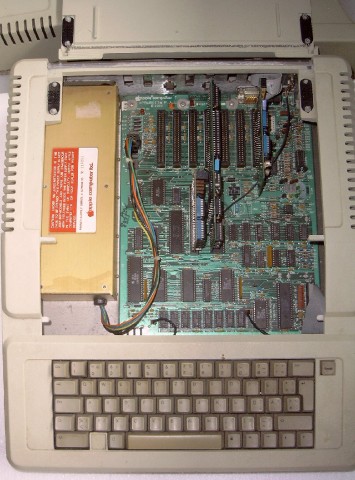
Open Apple IIe

Despite affecting compatibility with a small number of software titles (particularly those that did not follow Apple programming guidelines and rules, used illegal opcodes that were no longer available in the new CPU, or used the alternate 80 column character set that MouseText now occupied) a fair bit of newer software — mostly productivity applications and utilities — require the Enhancement chipset to run at all. An official upgrade kit, consisting of these 4 replacement chips and an “Enhanced” sticker badge, was made available for purchase to owners of the original Apple IIe. An alternative at the time, which some users choose as a cost cutting measure, was to simply purchase their own 65C02 CPU and create (unlicensed and illegal) duplicates of the updated ROMs using re-rewritable EPROM chips. When Apple phased out the Enhancement kit in the early 1990s, this became the only available method for users looking to upgrade their IIe, and remains so right up until present day. An Enhanced machine identifies itself with the name “Apple //e” on its start up splash screen (as opposed to the less specific “Apple ][“).

The Platinum IIe

In January 1987 came the final revision of the Apple IIe, often referred to as the Platinum IIe, due to the color change of its case to the light-grey color scheme that Apple dubbed “Platinum”. Changes to this revision were mostly cosmetic to modernize the look of the machine. Besides the color change, there was a new keyboard layout with built-in numeric keypad. The keyboard was changed to match the layout of the Apple IIGS, with the reset key moved above the ESC and ‘1’ keys, the Open and Solid Apple modifier keys replaced by Command and Option and the power LED relocated above the numeric keypad. Gone were the recessed metal ID badges (showing the Apple logo and name, with “//e” beside it) replaced with a simpler “Apple IIe” silk screened on the case lid in the Apple Garamond font. A smaller Apple logo badge remained, however moved to the right side of the case.

Internally, a (reduced in size) Extended 80 Columns Card was factory pre-installed, making it come standard with 128 KB RAM and Double-Hi-Res graphics enabled. The motherboard has a reduced chip count by merging the two system ROM chips into one and used higher density memory chips so its 64 KB RAM could be made up of two (64 Kbx4) chips rather than eight (64 Kbx1) chips, bringing the count down to a total of 24 chips. A solder pad location on the motherboard, present since the original IIe, for (optionally) making presses of the “Shift” keys detectable in software, is now shorted by default so that the feature is always active. Next, in a move to reduce Radio Frequency Interference when a joystick plugs into the motherboard’s Game I/O socket, filtering capacitors were added. While this made no difference to the average user, it had the negative effect of lowering the available bandwidth to the socket, which is often used by specialized devices for such purposes as measuring temperature, controlling a robotic device, or even simplistic networking for data transfer to another computer. In such cases the specialized devices were rendered useless on the Platinum IIe unless the user removed the capacitors from the board.

There were no firmware changes present, and functionally the motherboard is otherwise identical to the Enhanced IIe. This final model of the Apple IIe was discontinued in November 1993, officially retiring the entire Apple II family line with it.

The Apple IIe Card for Macintosh

In March 1991, shortly after the release of the Macintosh LC series, Apple released the PDS slot-based Apple IIe Card for the Macintosh. By plugging this card into a Macintosh LC (and later models incorporating an LC PDS slot), through hardware and (some) software emulation, the Macintosh can run most software written for the 8-bit Apple IIe computer. This miniaturized computer on a card was made possible by a chip called the Mega II, first used in the Apple IIGS computer to emulate the Apple IIe. The Mega II duplicates all the functions of a standard Apple IIe, minus RAM, ROM and CPU.

Many of the built-in Macintosh peripherals can be “borrowed” by the card when in Apple II mode (i.e. extra RAM, 3½ floppy, AppleTalk networking, clock, hard disk). It can even run at an accelerated 2 MHz, however as video is emulated using Macintosh QuickDraw routines, in slower machines it sometimes can not keep up with the speed of a real Apple IIe. With a specialized Y-cable, the card can use an actual Apple 5.25, Apple UniDisk 3.5 or even Apple II joystick/paddles. The Apple IIe Card is thought of as an Apple II compatible or emulator rather than an extension of the Apple II line, but included in this article for the sake of completeness.

International versions

The Apple IIe keyboard differed depending on what region of the world it was sold in. Sometimes the differences were very minor, such as extra local language characters and symbols printed on certain keycaps (e.g. French accented characters on Canadian IIe such as “á”, “é”, “ç”, etc, or the British Pound “£” symbol on the UK IIe) while other times the layout and shape of keys greatly differed (e.g. European IIe). In order to access the local character set and keyboard layout, a user-accessible switch is found on the underside of the keyboard — flipping it will instantly switch the video output and keyboard input from the US character set to the local set. To support this, special double capacity video and keyboard ROMs are used; in early motherboards they had to reside on a tiny circuit card that plugged into the socket. In some countries these localized IIe’s also support 50 Hz PAL video instead of the standard 60 Hz NTSC video and the different 220/240 volt power of that region. An equivalent of the “PAL color card” for the earlier Apple II europlus model was integrated into the motherboard of these IIe’s, so that color graphics are available without the addition of a slot card.

Another difference with the European IIe, is the Auxiliary slot physically moved in location so it is in line and in front of slot-3, preventing both slots from being used simultaneously for full-sized cards. A few third-party cards are affected by this: some European cards that plug into both slots simultaneously and are thus unusable on American IIe’s, and some American cards that don’t fit into the case of European IIe’s because the European location of the Auxiliary slot leaves less room for them.

Upgrades

The Apple IIGS Upgrade

When the Apple IIGS computer was introduced by Apple Computer in September 1986, Apple also announced it would be making an upgrade kit for the IIe available for purchase. Essentially the “upgrade” replaced the Apple IIe motherboard for a 16-bit Apple IIGS motherboard, making it more of an outright computer transplant than upgrade. Users would bring their Apple IIe machines into an authorized Apple dealership, where the IIe motherboard and lower baseboard of the case were swapped for an Apple IIGS motherboard with a new baseboard (with matching cut-outs for the new built-in ports). New metal sticker ID badges replaced those on the front of the Apple IIe, rebranding the machine. Retained were the upper half of the IIe case, the keyboard, speaker and powersupply. Original IIGS motherboards (those produced between 1986 to mid 1989) have electrical connections for the IIe powersupply and keyboard present, although only about half produced have the physical plug connectors factory pre-soldered in, which were mostly reserved for the upgrade kits.

The upgrade cost US$500, plus the trade-in of the user’s existing Apple IIe motherboard and baseplate (and in some cases, the upper half of the IIe case itself for very early Apple IIe units which couldn’t accommodate the new baseplate) .
Back view of IIGS upgrade, note the new port openings and connectors.

It proved unpopular as it did not include a mouse (which is an essential part of the IIgs, much like the Macintosh); the keyboard, although functional, does not mimic all the features and functions of the Apple Desktop Bus keyboard, as well as lacking a numeric keypad; and some cards designed for the new 16-bit machine did not fit in the Apple IIe’s slanted case either. In the end most users found they were not saving much, once they had to purchase a 3.5 floppy drive, analog RGB monitor and mouse. Although it could use some IIe peripherals, most of them became obsolete in the upgrade due to their function being already built-in. It did however make an attractive upgrade for Apple IIe users wanting to use the machine strictly in IIe-emulation mode (ignoring the native part of the machine), which provide faster CPU operation, 256 KB RAM, a clock and many built-in peripherals via the backports.

CPU
CPU: MOS Technology/SynerTek 6502
CPU Speed: 1 MHz
FPU: none
Bus Speed: 1 MHz
Data Path Width: 8 bit
Address Width: 8 bit
ROM: 16 kB
Onboard RAM: 64 kB
RAM slots: expansion via 1st slot
Maximum RAM: 128 k, with Extended 80 Columns Card
Expansion Slots: 8 proprietary

Video
Max Resolution: 40/80×24 text, 4-bit 40×48, 6 color 140×192, 4-bit 140×192, 1-bit 240×192, 1-bit 560×192

Storage
Floppy Drive: optional

Input/Output
Speaker: mono

Miscellaneous
Family: Pre-Macintosh
Codename: Diana
Introduced: January 1983
Terminated: March 1985

Sources:

“Apple IIe.” Wikipedia, The Free Encyclopedia. 5 May 2009, 21:21 UTC. 5 May 2009 <http://en.wikipedia.org/w/index.php?title=Apple_IIe&oldid=288134928>.

apple-history.com

This entry is published under the GNU General Public License.

Apple II

Apple II

Apple II

CPU

CPU: MOS Technology 6502
CPU Speed: 1 MHz
FPU: none
Bus Speed: 1 MHz
Data Path: 8 bit
ROM: 12 kB
RAM slots: 1st expansion slot can be used
Expansion Slots: 8 proprietary
Video
Max Resolution: 6 color at 280×192, 4-bit color at 40×48
Storage
Floppy Drive: optional
Input / Output
Serial: optional expansion card
Speaker: mono
Miscellaneous
Floppy Drive: optional
Codename: ?
Introduced: 1977
Terminated: 1980

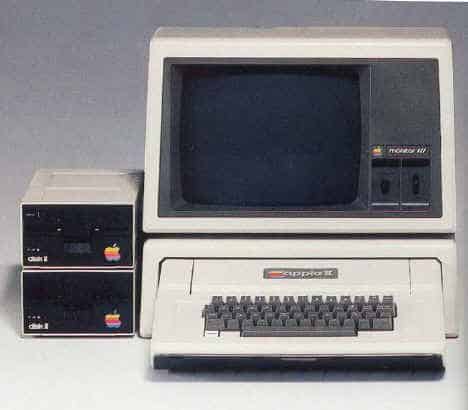
The Apple II (often written as Apple ][ or Apple //) was the first mass produced microcomputer product, manufactured by Apple Computer (now Apple Inc.). It was among the first home computers on the market, and became one of the most recognizable and successful. In terms of ease of use, features and expandability the Apple II was a major technological advancement over its predecessor, the Apple I, a limited production bare circuit board computer for electronics hobbyists which pioneered many features that made the Apple II a commercial success. Introduced at the West Coast Computer Faire in 1977, the Apple II was among the first successful personal computers and responsible for launching the Apple company into a successful business. Throughout the years a number of different models were introduced and sold, with the most popular model manufactured having relatively minor changes even into the 1990s. By the end of its production in 1993, somewhere between five and six million Apple II series computers (including approximately 1.25 million Apple IIGS models) had been produced.

Throughout the 1980s and much of the 1990s, the Apple II was the de facto standard computer in American education; some of them are still operational in classrooms today. The Apple II was popular with business users as well as with families and schools, particularly after the release of the popular spreadsheet, VisiCalc, which initially ran only on the Apple II.

The original Apple II operating system was only the built-in BASIC interpreter contained in ROM. Apple DOS was added to support the diskette drive; the last version was “Apple DOS 3.3”. Apple DOS was superseded by ProDOS to support a hierarchical filesystem and larger storage devices. With an optional Z80 based expansion card the Apple II could even run the popular Wordstar and dBase software under the CP/M operating system. At the height of its evolution, towards the late 1980s, the platform had the graphical look of a hybrid of the Apple II and Macintosh with the introduction of the Apple IIGS. By 1992, the platform featured 16-bit processing capabilities, a mouse driven Graphical User Interface and graphic and sound capabilities far beyond the original.
After years of focus on Apple’s Macintosh product line, it finally eclipsed the Apple II series in the early 1990s. Even after the introduction of the Macintosh, the Apple II had remained Apple’s primary revenue source for years: the Apple II and its associated community of third-party developers and retailers were once a billion-dollar-a-year industry. The Apple IIGS model was sold through to the end of 1992. The Apple IIe model was removed from the product line on October 15, 1993, ending an era.

Source:
Apple II series. (2008, October 11). In Wikipedia, The Free Encyclopedia. Retrieved 11:54, October 12, 2008, from http://en.wikipedia.org/w/index.php?title=Apple_II_series&oldid=244519623

This article is published under the GNU General Public License

Apple I and Apple II

Apple I

Apple II

CPU

CPU

CPU: MOS Technology 6502 CPU: MOS Technology 6502
CPU Speed: 1 MHz CPU Speed: 1 MHz
FPU: none FPU: none
Bus Speed: 1 MHz Bus Speed: 1 MHz
Data Path: 8 bit Data Path: 8 bit
Onboard RAM: 8 kB ROM: 12 kB
Maximum RAM: 32 kB RAM slots: 1st expansion slot can be used
Expansion Slots: 8 proprietary
Video Video
VRAM: 1 kB
Max Resolution: 60.05 Hz, 40×24 char Max Resolution: 6 color at 280×192, 4-bit color at 40×48
Storage
Floppy Drive: optional
Input / Output
Serial: optional expansion card
Speaker: mono
Miscellaneous Miscellaneous
Codename: ? Floppy Drive: optional
Power: 58 Watts Codename: ?
Introduced: April 1976 Introduced: 1977
Terminated: 1977 Terminated: 1980

Apple I

Apple I

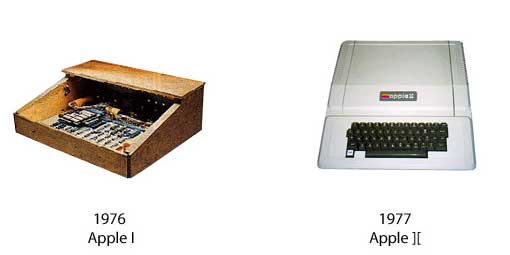
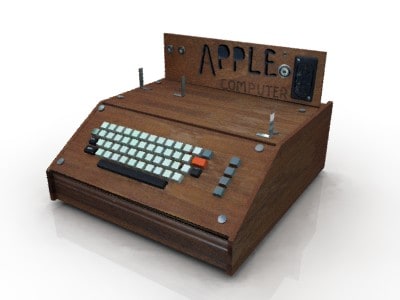
The Apple I, also known as the Apple-1, was an early personal computer. They were designed and hand-built by Steve Wozniak. Wozniak’s friend Steve Jobs had the idea of selling the computer. The Apple I was Apple’s first product, demonstrated in April 1976 at the Homebrew Computer Club in Palo Alto, California. It went on sale in July 1976 at a price of $666.66, because Wozniak liked repeating digits and because they originally sold it to a local shop for $500 and added a one-third markup. About 200 units were produced. Unlike other hobbyist computers of its day, which were sold as kits, the Apple I was a fully assembled circuit board containing about 30 chips. However, to make a working computer, users still had to add a case, power supply, keyboard, and display. An optional board providing a cassette interface for storage was later released at a cost of $75.

The Apple I is sometimes credited as the first personal computer to be sold in fully assembled form; however, some argue that the honor rightfully belongs to other machines, such as the MOS Technology KIM-1, Datapoint 2200, or more commonly the Altair 8800 (which could be bought in kit or assembled form at extra cost). One major difference sets the Apple I apart — it was the first personal computer to use a keyboard.

The Apple I’s built-in computer terminal circuitry was distinctive. All one needed was a keyboard and an inexpensive video monitor. Competing machines such as the Altair 8800 generally were programmed with front-mounted toggle switches and used indicator lights (red LEDs, most commonly) for output, and had to be extended with separate hardware to allow connection to a computer terminal or a teletype machine. This made the Apple I an innovative machine for its day. In April 1977 the price was dropped to $475.[5]. It continued to be sold through August 1977, despite the introduction of the Apple II in April 1977, which began shipping in June of that year.[6] The Apple II was otherwise identical to the Apple I, except it added more RAM, color graphics, sound capabilities, additional expansion slots and was notably contained in a styled plastic case with an integrated keyboard. Apple had dropped the Apple 1 from its price list by October 1977, officially discontinuing it.

As of 2008, an estimated 30 to 50 Apple Is are still known to exist, making it a very rare collector’s item. An Apple I reportedly sold for $50,000 at auction in 1999; however, a more typical price for an Apple I is in the $14,000–$16,000 range. A software-compatible clone of the Apple I (Replica 1) produced using modern components, was released in 2003 at a price of around $200.

Source:
Apple I. (2008, September 28). In Wikipedia, The Free Encyclopedia. Retrieved 11:50, October 12, 2008, from http://en.wikipedia.org/w/index.php?title=Apple_I&oldid=241506300

Apple II

The Apple II (often written as Apple ][ or Apple //) was the first mass produced microcomputer product, manufactured by Apple Computer (now Apple Inc.). It was among the first home computers on the market, and became one of the most recognizable and successful. In terms of ease of use, features and expandability the Apple II was a major technological advancement over its predecessor, the Apple I, a limited production bare circuit board computer for electronics hobbyists which pioneered many features that made the Apple II a commercial success. Introduced at the West Coast Computer Faire in 1977, the Apple II was among the first successful personal computers and responsible for launching the Apple company into a successful business. Throughout the years a number of different models were introduced and sold, with the most popular model manufactured having relatively minor changes even into the 1990s. By the end of its production in 1993, somewhere between five and six million Apple II series computers (including approximately 1.25 million Apple IIGS models) had been produced.

Throughout the 1980s and much of the 1990s, the Apple II was the de facto standard computer in American education; some of them are still operational in classrooms today. The Apple II was popular with business users as well as with families and schools, particularly after the release of the popular spreadsheet, VisiCalc, which initially ran only on the Apple II.

The original Apple II operating system was only the built-in BASIC interpreter contained in ROM. Apple DOS was added to support the diskette drive; the last version was “Apple DOS 3.3”. Apple DOS was superseded by ProDOS to support a hierarchical filesystem and larger storage devices. With an optional Z80 based expansion card the Apple II could even run the popular Wordstar and dBase software under the CP/M operating system. At the height of its evolution, towards the late 1980s, the platform had the graphical look of a hybrid of the Apple II and Macintosh with the introduction of the Apple IIGS. By 1992, the platform featured 16-bit processing capabilities, a mouse driven Graphical User Interface and graphic and sound capabilities far beyond the original.
After years of focus on Apple’s Macintosh product line, it finally eclipsed the Apple II series in the early 1990s. Even after the introduction of the Macintosh, the Apple II had remained Apple’s primary revenue source for years: the Apple II and its associated community of third-party developers and retailers were once a billion-dollar-a-year industry. The Apple IIGS model was sold through to the end of 1992. The Apple IIe model was removed from the product line on October 15, 1993, ending an era.

Source:
Apple II series. (2008, October 11). In Wikipedia, The Free Encyclopedia. Retrieved 11:54, October 12, 2008, from http://en.wikipedia.org/w/index.php?title=Apple_II_series&oldid=244519623

This article is published under the GNU General Public License

Mac OS 3 (System 3.0)

System 3.0 was introduced with the Mac Plus, officially implementing HFS and 800K startup drives and adding support for several new technologies including SCSI and AppleShare and introducing Trash “bulging” (i.e., when the Trash contained files, it would gain a bulged appearance). System 4.0 came with the Mac SE and Macintosh II, which required additional support for the first expansion slots, the Apple Desktop Bus (ADB), internal hard drives and on the Mac II, color, larger displays and the first Motorola 68020 processor.

Source: Article “History of Mac OS”. (2008, December 23). In Wikipedia, The Free Encyclopedia. Retrieved 09:37, December 24, 2008, from http://en.wikipedia.org/w/index.php?title=History_of_Mac_OS&oldid=259775290

This entry is published under the GNU General Public License.
Mac OS 1 (System)

The first version of the Mac OS (simply called System) is easily distinguished between other operating systems from the same period because it does not use a command line interface; it was one of the first operating systems to use an entirely graphical user interface. Additional to the system kernel is the Finder, an application used for file management, which also displays the Desktop. The two files were contained in a folder directory labeled System Folder, which contained other resource files, like a printer driver, needed to interact with the System.

These releases could only run one application at a time, though special application shells such as Switcher (discussed under MultiFinder) could work around this to some extent. System 1.0, 1.1, and 2.0 used a flat file system with only one kludged level of folders, called Macintosh File System (MFS); its support for folders (subdirectories) was incomplete. System 2.0 added support for AppleTalk and the newly introduced LaserWriter to use it. System 2.1 (Finder 5.0) introduced the HFS (Hierarchical File System) which had real directories. This version was specifically to support the Hard Disk 20 and only implemented HFS in RAM, startup and most floppy disks remained MFS 400K volumes.

Source: Article “History of Mac OS”. (2008, December 23). In Wikipedia, The Free Encyclopedia. Retrieved 09:37, December 24, 2008, from http://en.wikipedia.org/w/index.php?title=History_of_Mac_OS&oldid=259775290

This entry is published under the GNU General Public License.
Mac OS 7.0

System 7 (codenamed “Big Bang” and sometimes called Mac OS 7) is a single-user graphical user interface-based operating system for Macintosh computers. It was introduced on May 13, 1991 by Apple Computer. It succeeded System 6, and was the main Macintosh operating system until it was succeeded by Mac OS 8 in 1997. Features added with the System 7 release included cooperative multitasking, virtual memory, personal file sharing, an improved user interface, QuickTime, and QuickDraw 3D.
“System 7” is often used generically to refer to all 7.x versions. With the release of version 7.6 in 1997, Apple officially renamed the operating system “Mac OS”, a name which had first appeared on System 7.5.1’s boot screen. System 7 was developed for the Motorola 68k processor, but was ported to the PowerPC after Apple adopted the new processor.

Features

Compared with System 6, System 7 offered:

  • Built-in co-operative multitasking. In System 6, this function was optional through the MultiFinder; in System 7 it was mandatory.
  • Trash was now a formal directory, allowing items to be preserved between reboots and disk eject events instead of being purged.
  • Personal File Sharing. Along with various UI improvements for AppleTalk setup, System 7 also included a basic file sharing server allowing any machine to publish folders to the AppleTalk network.
  • Aliases. An alias is a small file that represents another object in the file system. A typical alias is small, between 1 and 5 KB. It acts as a redirect to any object in the file system, such as a document, an application, a folder, a hard disk, a network share or removable medium or a printer. When double-clicked, the computer will act the same way as if the original file had been double-clicked. Likewise, choosing an alias file from within an “Open” dialog box would open the original file. (Unlike the path-based approach of Microsoft Windows 95, aliases also store a reference to the file’s catalog entry, so they continue work even if the file is moved or renamed. Aliases can be best described as a fusion of a hard link and a symbolic link on Unix-based systems, including Mac OS X.)
  • Drag and drop. Document icons could be dragged with the mouse and “dropped” onto application icons to open in the targeted application. Under System 6, one had to first open the desired application and use its Open dialog box. This led to new desk accessories—such as StuffIt Expander—whose main interactions were intended to be via drag and drop.
  • “System extensions” (small pieces of INIT code that extended the system’s functionality) were improved by relocating them to their own subfolder (rather than in the root level of the System Folder itself as on earlier versions), and by allowing the user to hold down the Shift key during bootup to disable them. Later versions of System 7 offered a feature called “Extensions Manager” which simplified the process of enabling/disabling individual extensions. Extensions were often a source of instability and these changes made them more manageable and assisted trouble-shooting.
  • The Control Panel desk accessory became the Control Panels folder (found in the System Folder, and accessible to the user from an alias in the Apple menu). The control panels themselves became separate files, stored within this directory.
  • Under System 6, Control Panels and Extensions were known as CDEVs and INITs respectively. System 7 presented the more user-friendly nomenclature in the interface.
  • The Apple menu (previously home only to desk accessories pulled from “DRVR” resources in the System file) now listed the contents of a folder (“Apple Menu Items”), including aliases. Desk accessories had originally been intended to provide a form of multitasking and were no longer necessary now that real multitasking was always enabled. The desk-accessory technology was deprecated, with System 7 treating them largely the same as other applications. Desk accessories now ran in their own process rather than borrowing that of a host application.
  • The Application menu, a list of running applications formerly at the bottom of the Apple menu under MultiFinder, became its own menu on the right. In addition, Hide/Show functionality was introduced, allowing the user to hide applications from view while still keeping them running.
    Balloon Help, a widget-identification system similar to tooltips.
  • AppleScript, a scripting language for automating tasks. While fairly complex for application programmers to implement support for it, this feature was powerful and popular with users, and a version of it is still available to this day as part of Mac OS X.
  • AppleEvents. Supporting AppleScript was a new model for “high-level” events to be sent into applications, along with support to allow this to take place over an AppleTalk network.
  • 32-bit QuickDraw, supporting so-called “true color” imaging, was included as standard; it was previously available as a system extension. QuickDraw was used in Mac OS for fast on-screen drawing.
    Publish and Subscribe. This feature permitted data “published” by one application to be imported (“subscribed to”) by another, and the data could be updated dynamically. Programmers complained that the API was unwieldy, and relatively few applications ended up adopting it.
  • TrueType outline fonts. Up to this point, all fonts on the Macintosh were bitmapped, or a set of bitmapped screen fonts paired with outline PostScript printer fonts; TrueType for the first time offered a single font format that looked great at any size on screen and on paper. This technology was recognized as being so important that a TrueType extension for System 6 was also released, along with an updated Font/DA Mover capable of installing these new kinds of fonts into the System 6 System file.
  • A new full-color user interface. Although this feature made for a visually-appealing interface, it was optional. On machines not capable of displaying color, or those with their display preferences set to monochrome, the interface defaulted back to the black-and-white look of previous versions. Only some widgets were colorized — scrollbars, for instance, had a new look, but buttons remained in black and white.
  • A new Sound Manager API, version 2.0, replaced the older ad hoc APIs. The new APIs featured significantly improved hardware abstraction, as well as higher-quality playback. Although technically not a new feature for System 7 (these features were available for System 6.0.7), Sound Manager 2.0 was the first widespread implementation of this technology to make it to most Mac users.
  • System 7 paved the way for a full 32-bit address space, from the previous 24-bit address space. This process involved making all of the routines in OS code use the full 32-bits of a pointer as an address — prior systems used the upper bits as flags. This change was known as being “32-bit clean”. While System 7 itself was 32-bit clean, many existing machines and thousands of applications were not, so it was some time before the process was completed. To ease the transition, the “Memory” control panel contained a switch to disable this feature, allowing for compatibility with older applications.
  • System 7.1 marked the advent of System Enablers, small extensions that were loaded at startup to support Macintosh models introduced since the last OS revision. Under System 6, Apple had to introduce a number of minor revisions to the OS solely for use with new hardware. Apple introduced an unprecedented number of new Macs during the System 7 era, leading to some confusion over which System Enabler went with which computer(s).

Software

System 7 was the first version of the Mac OS that required a hard drive as it was too large to work comfortably from floppy disk. It was also the first Apple operating system to be available on CD. System 7 itself did not come bundled with major software packages, however newly purchased Macintosh computers were often bundled with software such as HyperCard, ClarisWorks, Power Pete, Mac-Chess, and Netscape. PowerPC Macintoshes included Graphing Calculator. System 7 also included networking and file sharing software in the form of system extensions and control panels.
The basic utilities installed by default with System 7 included TeachText (superseded by the more flexible SimpleText in later versions) for basic text editing tasks and reading readme documents. Also available on the additional “Disk Tools” floppy disk are Disk First Aid for disk repair and Apple HD SC Setup for initializing and partitioning disks.
Later versions of System 7, specifically System 7.5 and Mac OS 7.6, came with a dedicated “Utilities” folder and “Apple Extras” folder including: AppleScript, Disk Copy, QuickDraw GX Extras and QuickTime Movie Player. More optional extras and utilities could be manually installed from the System CD.

Transition to PowerPC

System 7.1.2 was the first version of the Mac OS to support Apple’s new PowerPC-based computers. 68k applications which had not yet been updated to run natively on these systems were emulated transparently (without users’ knowledge) by a built-in 68k processor emulator. Fat binaries, which contained the code necessary to run natively on both PowerPC and 68k systems, became common during this time. This process was similar to the distribution of universal binaries during Apple’s transition from PowerPC to Intel processors in 2006.

PC compatibility

System 7.0 through 7.1 offered a utility called Apple File Exchange, which could access the contents of FAT- and Apple II-formatted floppy disks. System 7 Pro, System 7.5 and up shipped with PC Exchange, previously a separate product, which allowed the system to mount FAT-formatted floppy disks on the desktop in the same manner as regular Macintosh disks. System 7 also can read HPFS and NTFS formatted drives. OS/2 disks were read as PC-DOS disks, due to fact that OS/2 used the FAT file system. At this time, Macs could also read and write UNIX file systems with the help of extra software. System 7 allowed users to access PC networks and allowed communication. Third party software such as SoftPC allowed compatibility between MS-DOS and Microsoft Windows programs while others such a Connectix Virtual PC allowed the Mac to run Windows and the Mac OS to run via emulation. Others took a more native approach by running Windows and MS-DOS by using x86 expansion cards with an x86 chip on the card.
[edit]Miscellaneous

At the time of its release, many users noticed that performance suffered as a result of upgrading from System 6 to System 7, though newer hardware soon made up for the speed differential. Another problem was System 7’s large “memory footprint”: System 6 could boot the system from a single floppy disk and took up about 600 KB of RAM, whereas System 7 used well over a megabyte, and could no longer be usefully run from floppy-only machines without the aid of an external SCSI hard drive. (Versions up to 7.5 could boot from a floppy, but there would be no room for other applications, although it was possible to access an AFP server on an AppleTalk network.) It was some time before the average Mac shipped with enough RAM built in for System 7 to be truly comfortable. Offsetting this was the inclusion of a hard disk as standard in most Mac models; only the long-lived Mac Plus and certain models of the Macintosh SE did not ship with one.
System 7.0 was adopted quite rapidly by Mac users, and quickly became one of the base requirements for new software.
The engineering group within Apple responsible for System 7 came to be known as the “Blue Meanies”, named after the blue index cards on which were written the features that could be implemented in a relatively short time. In comparison, the pink index card features were handled by the Pink group, later becoming the ill-fated Taligent project.
System 7.0 was the last version of the Macintosh operating system that Apple made available without charge and allowed to be freely redistributed. Although it could be purchased from Apple, the cost was nominal and considered to only cover duplication and media. It was perfectly legal to copy a friend’s System 7 installation floppies, and it was common for Macintosh dealers to allow customers to use the store’s demo machines to copy System 7 install disks for the cost of a box of floppies. Many CD-ROM magazines such as Nautilus included System 7 on their disks. Apple started selling the Mac OS as a retail product with System 7.1. (System 7.5.3r2 is now similarly available for free from Apple’s web site, but was not posted until after it had been superseded.)

Source: Article “System 7”. (2008, December 10). In Wikipedia, The Free Encyclopedia. Retrieved 09:02, December 24, 2008, from http://en.wikipedia.org/w/index.php?title=System_7&oldid=257154261

This entry is published under the GNU General Public License.
Apple Switch Campaign – Ellen Feiss (2002)

&#160

The legendary Ad with Ellen Feiss is explained in this video:

Culture Chain: Internet Phenomena. Episode 1: Ellen Feiss

[ Compressed Data; Out-of-It Eyebrow Lift Gives Apple a Superstar – New York Times]
[Apple ‘Switch’ Star Flies High ]
[cootey.com: the apple of
apple’s eye – ellen feiss
]
[Macenstein | Where are they now? Interview with “Switcher Girl” Ellen Feiss]